
Losing conversions you already paid for?
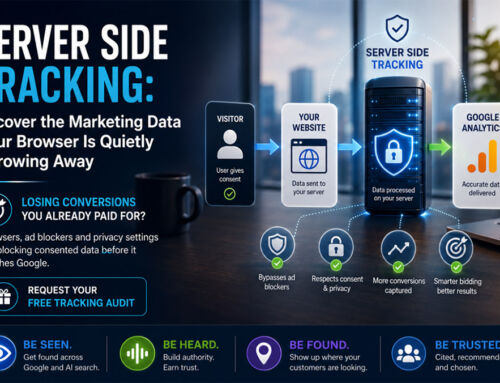
If you spend money on advertising, data is the lifeblood of everything you do. You already know this. What you might not know is that a silent problem is happening right inside your marketing stack, and it is costing you money every single day. You are paying to bring people to your website, those people are giving you full permission to track what they do, and yet a real chunk of that perfectly legal, fully consented data is simply vanishing before it ever reaches Google.
I want to walk you through why this happens, because once you understand it, you can fix it. The solution is called server side tracking, and for businesses spending meaningfully on ads it can be the difference between algorithms that guess and algorithms that actually know what is working. This is written for the person signing off the marketing budget, not the person configuring the tags, so I will keep it to what matters commercially and leave the technical setup to our team.
Let me explain what is going on, one piece at a time.
The letters that never arrive
Picture your customers handing you their information at the counter. They are saying, yes, absolutely, you can track my purchase. That permission is real and it is legal. But somehow the message never reaches your analytics dashboard. It is a little like posting perfectly legitimate letters, except the mail carrier quietly decides to throw some of them away before they get delivered.
That sounds like it should be against the rules, but it is not a glitch and it is not illegal. It is simply the reality of how web browsers work today. So before we get to the fix, we need to clear up a few things that most people misunderstand, because the confusion is where the data leak hides.
The cookie pop-up is only asking a question
Here is the first misconception I run into all the time. People assume that once they have slapped a cookie pop-up on their website, tracking and compliance are sorted. They are not.
Think of your website like opening a physical shop. When someone walks through the door, you naturally gather useful information. You notice what they look at, you have a sense of which ad brought them in, and you know whether they bought something at the till. In the digital world, privacy rules changed the game. Before you can collect any of that, you have to ask one simple question first. Is it okay if we collect this?
And honestly, that is all a cookie pop-up does. It asks a yes or no question. The pop-up itself does not store information, it does not analyse anything, and it certainly does not send anything to Google. It is just asking permission. Nothing more.
If you are running ads or investing in SEO, properly implemented server-side tracking is a must, not a maybe. It is the difference between managing your spend on facts and managing it on guesswork. The only exception is a site with no active expansion or visibility work. If that is you, a simple consent pop-up will do the job.
Cathy Mellett, Director, Net Branding
Consent Data Value Calculator
Model what degraded ad data could be costing, and what the tool protects.
How to read this. Above the break-even point, the tool costs less than the wasted spend. Below it, the loss is cheaper than the tool. The inefficiency figure is an assumption you control, not a measured number. The tool fee is fixed in euros, so the NZD figure moves with the exchange rate.
So why does the data still get lost?
Here is the part that catches people out. The visitor clicks I accept. The translator gives Google the go-ahead. Google Analytics starts measuring. And your data still does not show up in your reports. How?
This brings us right back to the letters that never arrive. Today’s browsers are aggressively privacy focused. Safari blocks things. Firefox blocks things. You have ad blockers, browser extensions, corporate firewalls, and increasingly Chrome itself putting up roadblocks. So even though your visitor gave you full permission to track their purchase, their browser intercepts the letter and shreds it before it reaches Google.
It helps to see where the losses actually come from, because it is rarely one big thing. It is a series of small leaks that add up quietly until you are missing a serious slice of the picture.
| Where the loss comes from | What it does to your data |
|---|---|
| Safari and iOS privacy settings | Cuts tracking short on a large share of mobile visitors, so their conversions go missing. |
| Ad blockers and browser extensions | Block the tracking scripts outright before they ever send anything. |
| Firefox tracking protection | Strips out tags by default for a chunk of your desktop audience. |
| Corporate firewalls and networks | Quietly filter tracking on business and enterprise visitors. |
| Chrome tightening up | Adds more restrictions each year, so the leak keeps widening over time. |
This is the leak. It is invisible, it is happening right now on most websites, and it gets worse every year as browsers tighten up. Which is exactly why the fix exists.
Client side versus server side, in plain terms
If you only remember one distinction from this piece, make it this one. The old way, client side tracking, leans on the visitor’s browser to do the delivery. The new way, server side tracking, moves that job to your own server. Here is how they compare on the things a business owner actually cares about.
| What matters to you | Client side (the old way) | Server side (the new way) |
|---|---|---|
| Who delivers the data | The visitor's browser | Your own server |
| Ad blockers and Safari | Can quietly block it, so data goes missing | Cannot intercept it, so far more arrives |
| Data quality for bidding | Patchy, which makes the algorithms guess | More complete, so the algorithms decide on real signals |
| Control over what is shared | Limited, the browser sends what it sends | You decide what leaves your server |
| Site speed | Slower, scripts pile up in the browser | Lighter, more of the work happens off the page |
| Setup effort | Low, it is the default | Higher, it needs proper configuration and hosting |
Most businesses that make the move do not throw the old way out entirely. They run a sensible hybrid, keeping some things in the browser and moving the important performance data, the purchases and the leads, across to the server. You do not need to know how that is wired together. You just need to know that the missing letters start arriving.
The part that matters to the bottom line
This is where it stops being a technical topic and becomes a commercial one. Server side tracking is not an IT compliance project. It is a way to recover revenue-driving data you have already paid to earn.
When you bypass the browser blockades using your own server, you can typically recover a meaningful slice of the conversion data you are currently losing. If you are spending seriously on advertising, think about what that means in practice. You are now feeding more accurate, verified purchase data into Google’s automated bidding. And when those algorithms have better and more complete data, they make far smarter bidding decisions on your behalf.
Better data in means better decisions out, and better decisions out means less wasted spend and a measurable return.
That recovered data flows straight through into stronger campaign optimisation. For a business investing heavily every month, that is not a rounding error. It is money back.
If you are wondering what that slice looks like for your business specifically, we are happy to take a look and tell you. Ask us for a free tracking audit, no strings attached.
The technology changes. The way people decide to trust you does not. Handle their information with care and the rest follows.
An honest word on what it will not do
I am not going to pretend this is magic, because it is not, and you should treat anyone who says otherwise with a healthy dose of caution. Server side tracking is a genuinely good tool, but it comes with a few honest realities worth knowing before you spend a cent on it.
It takes real setup and it needs looking after. This is not a switch you flick once and forget. It involves proper configuration and its own hosting, which is exactly why most businesses bring in a specialist rather than doing it in-house. It does not recover everything either. It closes a big part of the gap that browsers have opened up, but no method captures one hundred percent of what happens on your site, and you should be suspicious of any promise that it will. And as I said above, it does not remove your privacy responsibilities. It sits alongside them.
None of that is a reason to avoid it. It is a reason to go in with clear eyes, which is how we prefer our clients to make every decision about their marketing spend.
Is it right for you yet?
I want to be balanced here, because we are not in the business of selling people things they do not need. Server side tracking is an optimisation, not a strict requirement. If your ad spend is relatively small right now, setting up standard consent mode properly may well be enough, and that should genuinely be your first priority. Get the foundation right before you build on top of it.
But once consent mode is running smoothly, and if you are investing significant amounts in ads every month, server side tracking becomes a genuinely valuable step worth evaluating. You have already done the hard work of getting visitors to your site. You have played by the rules to earn their consent. The only question left is whether you are going to let lost data quietly dictate your bidding decisions, or make sure the data you rightfully earned actually reaches the finish line.
If you are still not sure where you sit, this is roughly how we think about it with clients.
| If this sounds like you | The sensible next step |
|---|---|
| Modest ad spend, tracking still being set up | Get standard consent mode in place properly first. That is the priority. |
| Significant spend every month, mostly on Google and Meta | Server side tracking is worth evaluating now, the recovered data pays its way |
| A mobile-heavy or Safari-heavy audience | You are likely losing more than most, so it moves up the list |
| E-commerce or lead generation chasing clean attribution | A strong candidate, this is where better data shows up fastest in results |
| Unsure how much you are actually losing | Start with a look at your current setup before deciding anything |
Questions we get asked most
Is server side tracking legal in New Zealand?
Yes, when it is done properly. It changes how your data is delivered, not your obligation to collect it lawfully under the Privacy Act 2020. You still need consent, honesty about what you collect, and good care of the information afterwards.
Will it get all my lost data back?
No, and be cautious of anyone who says it will. It recovers a meaningful share of the conversions that browsers are currently blocking, but no approach captures everything. It closes the gap rather than erasing it.
Do I still need a cookie pop-up and consent mode?
Yes. Those handle asking for and communicating permission. Server side tracking handles delivery. They do different jobs and they work together, so you keep all three.
Is it worth it for a smaller ad budget?
Often not yet. If your spend is modest, get standard consent mode set up properly first. Server side tracking earns its keep once you are investing meaningfully in ads every month.
How long does it take to set up?
It is a considered project rather than a quick toggle, because it needs proper configuration and its own hosting. That is why most businesses bring in a specialist rather than attempting it in-house.